If you are developing with WSPBuilder and have started a project with a workflow do yourself a big favor.
Edit your .csproj file and add an import statement for the workflow foundation. Find the following line in a C# project or the vb equivalent "<Import Project=”$(MSBuildBinPath)\Microsoft.CSharp.targets” />" and add this line after it.
<Import Project=”$(MSBuildExtensionsPath)\Microsoft\Windows Workflow Foundation\v3.0\Workflow.Targets” />
At a minimum it will allow you to use declarative conditions. If you don't add this you'll have to use code conditions in your while loops.
Showing posts with label Workflow. Show all posts
Showing posts with label Workflow. Show all posts
Monday, December 28, 2009


Saturday, October 24, 2009
Allow Anonymous Users to run SharePoint Workflows
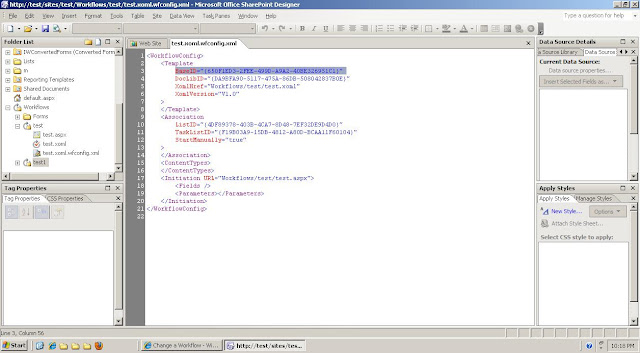
The code that follows will allow you to start a workflow from an event receiver. There are a couple of reasons that you may want to do this. First, you have more control over your workflow. You can check and make sure that it's started successfully. Second, you can allow users or processes to execute workflows that couldn't otherwise. Next is how you can find your workflow's guid.
OOB Workflow - get the TemplateID from the url
the guid here is 19149E7D-1970-4432-B174-D88C7BF2B4008

using System;
using System.Collections.Generic;
using System.Text;
using Microsoft.SharePoint;
using System.Net;
using System.Diagnostics;
using Microsoft.SharePoint.Workflow;
namespace StartWorkflow
{
class StartWorkflowOnItemAdded : SPItemEventReceiver
{
// use the itemadded event to start a workflow
public override void ItemAdded(SPItemEventProperties properties)
{
try
{
// make sure no other events can be fired
DisableEventFiring();
// execute StartWorkflow as application pool
SPSecurity.RunWithElevatedPrivileges(delegate(){
StartWorkflow(properties);
});
}
catch (Exception ex)
{}
finally
{
// allow other events to fire
EnableEventFiring();
}
}
private void StartWorkflow(SPItemEventProperties properties)
{
using (SPSite site = new SPSite(properties.WebUrl))
{
using (SPWeb web = site.OpenWeb())
{
try
{
SPList list = web.Lists[properties.ListId];
//enter your workflow Guid
Guid wGuid = new Guid("{}");
//get the association data
SPWorkflowAssociation wTemplate =
list.WorkflowAssociations.GetAssociationByBaseID(wGuid);
//start your workflow
site.WorkflowManager.StartWorkflow(properties.ListItem,
wTemplate, wTemplate.AssociationData);
}
catch (Exception ex)
{}
}
}
}
}
}
SharePoint Designer Workflow - 650F1ED3-2FEE-499D-A9A2-40BE326951C1

OOB Workflow - get the TemplateID from the url
the guid here is 19149E7D-1970-4432-B174-D88C7BF2B4008

using System;
using System.Collections.Generic;
using System.Text;
using Microsoft.SharePoint;
using System.Net;
using System.Diagnostics;
using Microsoft.SharePoint.Workflow;
namespace StartWorkflow
{
class StartWorkflowOnItemAdded : SPItemEventReceiver
{
// use the itemadded event to start a workflow
public override void ItemAdded(SPItemEventProperties properties)
{
try
{
// make sure no other events can be fired
DisableEventFiring();
// execute StartWorkflow as application pool
SPSecurity.RunWithElevatedPrivileges(delegate(){
StartWorkflow(properties);
});
}
catch (Exception ex)
{}
finally
{
// allow other events to fire
EnableEventFiring();
}
}
private void StartWorkflow(SPItemEventProperties properties)
{
using (SPSite site = new SPSite(properties.WebUrl))
{
using (SPWeb web = site.OpenWeb())
{
try
{
SPList list = web.Lists[properties.ListId];
//enter your workflow Guid
Guid wGuid = new Guid("{}");
//get the association data
SPWorkflowAssociation wTemplate =
list.WorkflowAssociations.GetAssociationByBaseID(wGuid);
//start your workflow
site.WorkflowManager.StartWorkflow(properties.ListItem,
wTemplate, wTemplate.AssociationData);
}
catch (Exception ex)
{}
}
}
}
}
}
Subscribe to:
Posts (Atom)
